98%
Retention rate



Mike T.
Owner, Reliable Plumbing Co.


Dashboard
Your numbers, your jobs, your team — all on one screen.
Jobs Pipeline
Never lose track of a job again. Create a job in seconds, assign a tech, track its status, and tie it to an invoice — all in one place.
Invoicing
Invoice from the job site. Build detailed invoices with line items, deposits, and payment terms in minutes.
Invoicing
Invoice from the job site. Build detailed invoices with line items, deposits, and payment terms in minutes.
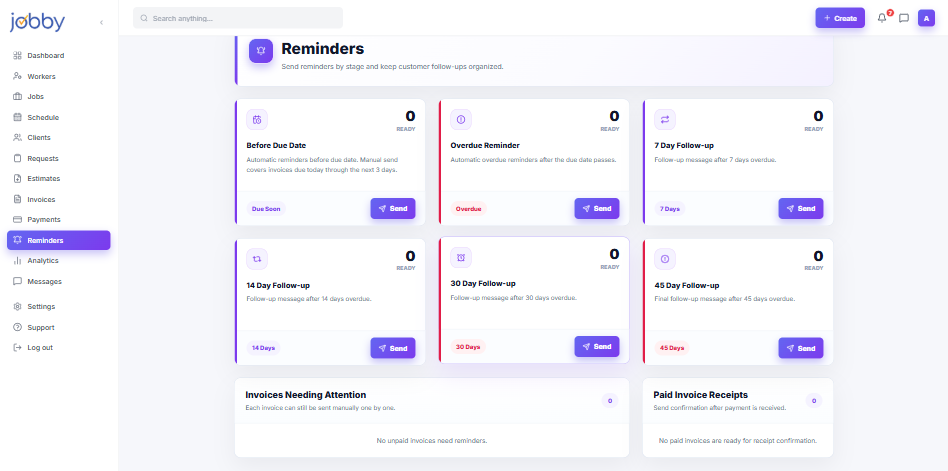
Payment Reminders
Stop chasing payments. Jobby does it for you. Deposit request, reminder, due date alert, and escalation notice.
Workers
Your whole crew, organized in one place. Add workers, assign specialties, and see who's available.
Analytics
Track revenue vs. outstanding payments, see which job categories are most profitable, and spot trends.
Community
Keep your team in the loop — without the group text chaos. Send messages, share updates, and keep job conversations tied to the right project.
Clients
Know your clients before you pick up the phone. Every client's contact details, job history, and payment status live in one clean profile.
Feature
Unpaid invoices quietly drain your margins. Jobby turns the uncomfortable chase into a calm, branded sequence — deposit nudges, due-date pings, gentle escalations, and thank-you confirmations — all timed to your terms and written in your voice.
98%
Retention rate
Capabilities
Jobby handles the full follow-up arc — from first deposit ask to final confirmation — so you can focus on the work, not the wallet.
Deposit, gentle nudge, due-day ping, and firm follow-up — each one fires on the schedule you set, or our research-backed defaults.
Send by SMS, email, or both. Jobby picks the channel your client actually opens, so reminders land instead of getting lost.
Warm on day one, businesslike by day thirty. Edit every template, or let our tone ladder handle the shift for you.
No more 'thanks, but we already paid' replies. Reminders switch off automatically the second an invoice is settled.
How it works
Use our proven four-touch sequence or dial in your own timing — down to the hour, per client or per job type.
Reminders go out branded as your business, across SMS and email, with a one-tap pay link attached.
Clients pay from the link, Jobby records it, and the follow-ups go silent — no manual cleanup, no double messages.
Case Study
Owner, Reliable Plumbing Co.
Real-world use
Reminders FAQ
Yes. Every message carries your company name, logo colors, and a reply-to address you choose. Clients never see 'Jobby' in the message — they see you, following up professionally.
Jobby checks payment status before each send. The moment an invoice is marked paid, the entire remaining sequence is cancelled — so no client ever gets a reminder for a bill they already settled.
Absolutely. You can edit every template word-for-word, or choose from three tone presets — friendly, neutral, and firm. You can also skip the escalation stage entirely if you prefer to handle overdue accounts yourself.
They do. You can trigger a deposit request the moment a quote is accepted, send balance reminders once the job wraps, and even schedule partial-payment milestones for larger projects.
No hard cap. Send as many reminders as your workflow needs across as many invoices as you have. Pricing is based on your plan tier and team size, not on message volume.
Your numbers, your jobs, your team — all on one screen. Real-time view of outstanding payments.....
A lighter-touch reminder flow for recurring clients and subscription-style billing, separate from one-off invoice follow-ups.
Invoice from the job site. Build detailed invoices with line items, deposits, and payment terms in.....